By Samar Ameer, Local SEO Specialist
A new Google review just landed. Maybe it's five stars and you're smiling. Maybe it's one star and your stomach just dropped. Either way, the same question hits you: what do I actually write back?
Here's the short answer. Thank the reviewer by name, mention one specific detail from their review, and — if something went wrong — say what you'll do about it and give them a direct way to reach you. Keep it under about 60 words. That's the whole formula, and every template in this guide follows it.
Below you'll find copy-paste responses for every situation: detailed five-star reviews, one-star complaints, reviews with no words at all, fake reviews, and even reviews from people who were never your customers. You'll also learn the mistakes that get owner replies reported and removed — a rule most businesses don't know exists.
How to reply to a Google review, step by step
You can only reply from a verified Google Business Profile that you own or manage. Google is strict about this: no verification, no reply button.
- On desktop: search your business name on Google while signed in to the account that manages your profile, or open Google Maps and select your business.
- Select Read reviews.
- Find the review and select Reply.
- Write your response and select Reply to post it.
On the Google Maps phone app it's the same flow: your profile → Reviews → Reply. A few facts worth knowing before you type anything:
- Your reply is public and appears under the review, posted under your business name.
- The reviewer gets notified when you reply — and they can edit their review afterwards.
- You can edit or delete your own reply later, so a typo isn't forever.
Yes — if you're an owner or manager of a verified Business Profile. Personal Google accounts that aren't linked to the profile can't reply, which is why the Reply button sometimes seems to "disappear": you're usually signed in to the wrong account.
Why responding to reviews is worth your time
Most owners think a reply is written for the person who left the review. It isn't. You're writing for the hundreds of future customers who will read that exchange while deciding whether to call you or the business down the road.
The numbers back this up. In BrightLocal's 2026 Local Consumer Review Survey, 89% of consumers said they expect businesses to respond to their reviews, and 80% said they're more likely to use a business that responds to all of its reviews — not just the glowing ones. Meanwhile, templated copy-paste replies put off around half of consumers. People can smell a canned response, and they judge you for it.
There's a second payoff: a calm, constructive reply sometimes convinces the reviewer to update their review. Google notifies them when you respond, and a complaint that gets resolved often turns into a better rating.
Replies won't single-handedly move your rankings — Google ranks local businesses on relevance, distance, and prominence. But Google itself encourages owners to reply because it shows you're active and responsive, and review activity is part of how customers (and Google) judge whether a profile is alive and trustworthy. Respond because it wins customers; the visibility benefit follows.
The 4-part formula behind every good response
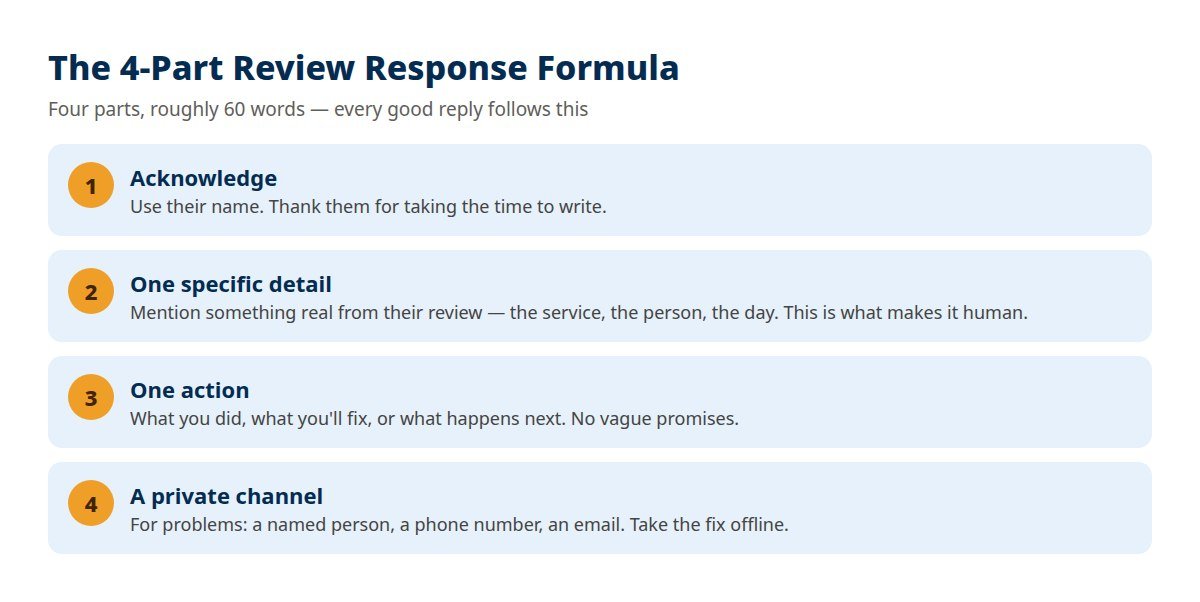
Every strong reply — positive or negative — is built from the same four parts:
- Acknowledge: use their name and thank them for the feedback.
- One specific detail: mention something real from their review — the service, the technician, the dish, the date. This single line is what separates a human reply from a template.
- One action: what you did, what you'll fix, or what happens next.
- A private channel: for problems, give a named person, phone number, or email so the fix happens offline.
Four or five sentences is enough. If you find yourself writing a sixth sentence to explain why the reviewer is wrong, delete it.
Positive review responses: templates you can copy
Positive reviews deserve more than "Thanks!" A specific reply tells the next reader why people love you — and quietly repeats the words customers search for. Here's a trick from real review data: mirror the customer's own words back. When reviewers praise "on-time arrival," "a fair price," or "no upselling," those exact phrases in your reply reinforce what future customers are looking for.
Five-star review with details
"Thank you, [Name]! We're glad the [specific service] went smoothly and that [team member] took good care of you. We appreciate you choosing [Business Name] — and we're here whenever you need us again."
Five-star review with no text (just stars)
"Thanks for the five stars, [Name]! It means a lot to the whole team. If there's anything we can do for you down the road, you know where to find us."
Four-star review (happy, with a small complaint)
"Thank you for the honest feedback, [Name]. Glad you were happy with [what went well] — and you're right about [the issue]. We've [action taken]. Next visit will be the full five stars."
First-time customer
"Welcome aboard, [Name] — thanks for giving us a try. Thrilled that [specific detail] hit the mark. Looking forward to seeing you again!"
Repeat customer
"[Name], customers like you are why we love this work. Thanks for trusting us with [service] again — we'll keep earning it."
All of them. The BrightLocal data above is about businesses that respond to every review. A profile where only complaints get replies looks defensive; a profile where everyone gets a personal reply looks like a business that cares.
Negative review responses: templates by situation
Rule one: don't reply in the first angry hour. Reply within 24–48 hours, calm, short, and factual. Never argue, never accuse, and never share the customer's personal details in public — your reply can be reported for that (more below).
The mixed 3-star review
"Thanks for the balanced feedback, [Name]. We're glad [positive part] worked out, and we're sorry [negative part] fell short. We've shared this with the team so it's handled differently next time. We'd value the chance to earn a higher rating on your next visit."
Service failure (2 stars)
"[Name], I'm sorry — that's not the standard we work to. I've looked into what happened with [specific issue], and [action taken]. Please call me directly at [phone] so I can make this right. — [Your name], [Owner/Manager]"
The angry 1-star review
"[Name], I hear you, and I'm sorry your experience left you this frustrated. I'd like to understand exactly what happened and fix it. Please reach out to me at [phone/email] — I'll personally look into it today. — [Your name]"
Price complaint
"Thanks for raising this, [Name]. We price [service] to include [what's covered — parts, warranty, guarantee], but I understand the final bill should never come as a surprise. Let me review your invoice with you — call me at [phone] and we'll go through it line by line."
Wait-time complaint
"You're right to flag this, [Name] — your time matters, and we kept you waiting too long. We've [added a second staff member on weekends / changed our booking gaps] so this doesn't repeat. Sorry again, and thank you for telling us straight."
When the mistake was genuinely yours
Sometimes the bad review is right. You missed the appointment, the order went out wrong, the bill was incorrect. In that case, a clean apology is the most persuasive thing a future customer can read:
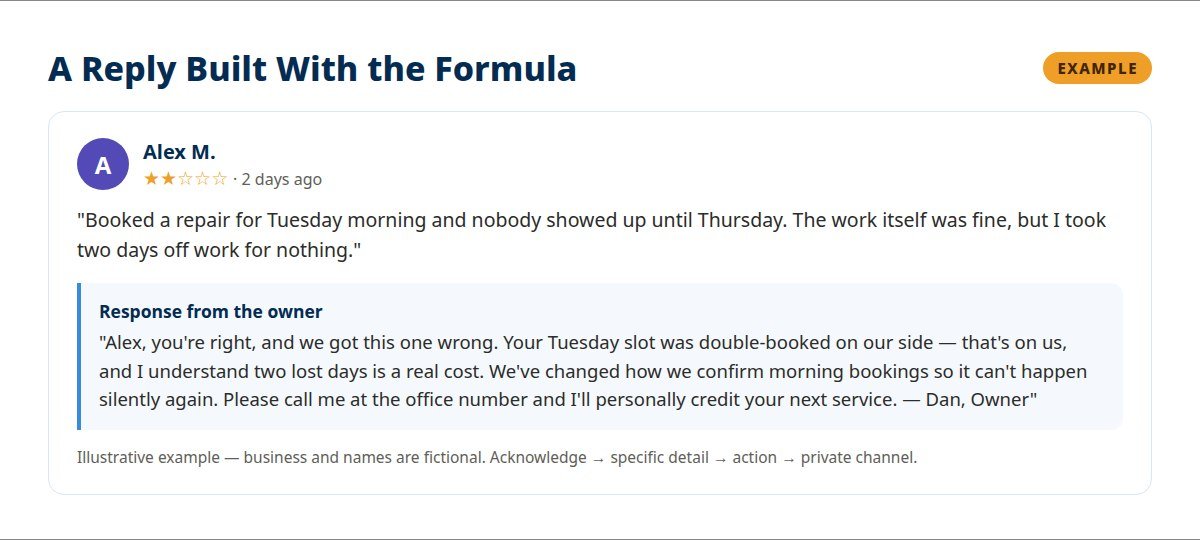
"[Name] — you’re right, and we got this one wrong. [Name the mistake plainly.] That’s on us. We’ve [the fix], and I’d like to put it right for you personally. Please call me at [phone]. — [Your name], Owner"
Own it, apologize, act. No excuses, no "but." Businesses that visibly own their mistakes convert more readers than businesses with spotless-but-suspicious profiles.
No. Businesses can't delete reviews — only Google can remove one, and only when it violates policy (fake, spam, hate speech, conflict of interest, or completely off-topic). For a genuine bad review, your reply is the tool you have. For a review that breaks the rules, use the flagging process in the next section.
Fake reviews — and reviews from people who were never customers
This is the section most review guides skip, and it's the situation owners find most frustrating. You get a one-star review from a name you don't recognize, describing a job you never did. Google rarely removes these on the first flag, because it's hard to prove a negative. Your public reply is what protects you — future customers read it and draw their own conclusion.
"We have no record of this customer"
"Hi [Name], we've checked our records carefully and can't find any visit or booking under this name. If we've mixed something up, please call us at [phone] with the date of your visit and we'll sort it out right away. If this review was meant for another business, we'd appreciate you moving it to the right profile."
The ex-employee review
"[Name], we're sorry your time working with us ended badly. Google reviews are meant for customer experiences, so we've flagged this for Google to review. We wish you well in what's next."
The wrong-business review
"[Name], we're sorry to hear about that experience — but we're the [your business type] on [street/area], and it sounds like this was meant for [the other business]. If you delete this and post it on their profile instead, it helps them fix it — and keeps our small team's rating honest."
How to flag a review for removal
- Open your Business Profile and find the review.
- Select the three dots → Report review.
- Choose the violation that fits: spam/fake engagement, conflict of interest, offensive content, or off-topic.
- Submit and wait — Google's evaluation typically takes several days, and a declined flag can be appealed once.
Google publishes exactly what it prohibits in its review content policy: fake engagement, impersonation, harassment, personal information, and off-topic content are all removable. A review that's merely unfair — but from a real customer — is not.
Your own reply can be reported too
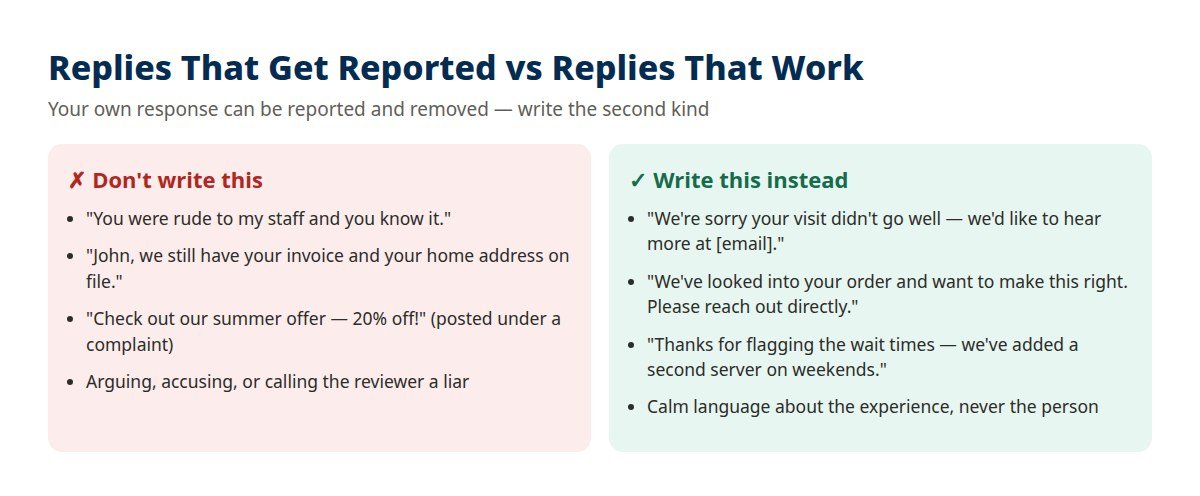
Here's what almost nobody tells business owners: your responses can be reported and removed under the same content rules. A reply that would get a review deleted will get your reply deleted — and the original complaint stays standing, now with no answer from you.
Five things that put a reply at risk:
- Customer's personal details — full name beyond what they posted, address, phone number, invoice or account details. Even if it's true. Even if you're defending yourself.
- Promotional content — dropping an offer or discount code under a complaint reads as an advert, not an apology.
- Arguing or accusing — calling the reviewer a liar, rude, or a competitor in public.
- Asking them to change the review in exchange for something — that's an incentive, and it's prohibited.
- Threats or identity comments — any language about who the reviewer is rather than what happened.
The words your customers actually use
I read through hundreds of real Google reviews across trades like plumbing and dental care to write this guide, and the same praise phrases appear again and again: "showed up when they said they would," "a fair price," "explained everything clearly," "no upselling or pressure," "a real person answers the phone," "respectful of my home."
Two lessons fall out of that language:
- Mirror it. When a happy customer says your plumber "explained everything clearly," replying with "explaining things clearly is exactly what we train for" quietly repeats a phrase the next customer is searching with.
- Watch the complaint themes, not just the stars. The most damaging reviews aren't about the core work — they're about silence, surprises, and waiting: no one called back, the final price differed from the quote, the appointment ran an hour late with no message. Most of those are communication failures you can fix this week.
7 response mistakes that make things worse
- The same reply on every review. Readers spot it instantly, and it signals the opposite of care.
- Replying angry. Your first draft is almost never the one to post. Wait, rewrite, then reply.
- Taking a week to respond. More than half of customers expect a reply to a negative review within a week; many businesses never reply at all. Being fast is a competitive advantage.
- "Thanks!" and nothing else on five-star reviews. You were given free advertising — add one specific line.
- Posting private details publicly. What they bought, where they live, what they owe — never, even in self-defense.
- Demanding the reviewer change their rating. Resolve the problem; the update is their choice.
- Never replying at all. A profile full of unanswered complaints tells every future customer exactly how you'll treat them.
Got a backlog? The 30-review catch-up plan
If you've ignored reviews for months and now face dozens of unanswered ones, don't start from the oldest. Work this order instead:
- Newest negative reviews first — these are the ones prospects are reading right now.
- Then all remaining negative and mixed reviews, newest to oldest.
- Then recent positive reviews (last 90 days) — older five-stars matter less.
- Then everything else, in short daily batches rather than one exhausting session.
Once you've caught up, keep it gone with a 10-minute weekly routine: every Friday, reply to the week's reviews. And track four numbers monthly: your reply rate (aim: every review), your time to reply (target: under 24 hours), your average rating trend over 90 days, and your re-review rate — how many unhappy reviewers update after you fix the problem. That last number is the truest measure of whether your responses work.
Agencies typically charge a monthly retainer that varies widely with location count and review volume — from a few hundred dollars a month for a single location to four figures for multi-location brands. If your review volume is under roughly 30 a month, the system in this guide plus 10 minutes a week usually covers it yourself.
Frequently asked questions
How do I respond to a Google review?
Sign in to the account that manages your verified Google Business Profile, open Read reviews, select Reply under the review, and post a response that thanks the reviewer by name, mentions one specific detail, states one action, and offers a private channel for problems. Aim for about 60 words.
Does responding to Google reviews help SEO?
Not as a direct ranking lever — local rankings run on relevance, distance, and prominence. But responding shows Google and customers that your profile is active and cared for, and it's what convinces readers to choose you. The BrightLocal 2026 survey found 80% of consumers are more likely to use a business that responds to all its reviews.
Can you respond to a Google review if your profile isn't verified?
No. Only owners and managers of a verified Business Profile can reply. If you can't see a Reply button, claim and verify the profile first — or check you're signed in with the account that manages it.
How do I get a negative review removed?
You can't remove it yourself. If it violates Google's policy — fake, spam, hate speech, conflict of interest, or entirely off-topic — report it from your profile and Google may remove it after review. Genuine criticism, however harsh, stays; your best move is a calm, public reply.
How quickly should I respond to a review?
Within 24–48 hours for negative reviews, and within a few days for positive ones. Speed signals reliability, and the reviewer is notified of your reply — a fast, fair response is your best chance of them updating the review.
What if I get a review from someone who was never a customer?
Reply calmly that you have no record of them, invite them to contact you with details, and flag the review under Google's fake-engagement policy. Never accuse them publicly — readers will see a professional business and draw the right conclusion.
The bottom line
Responding to Google reviews isn't admin work. It's the one part of your online reputation you fully control, written in public, read by exactly the people deciding whether to call you. Use the formula, borrow the templates, keep your replies specific and human — and never let a review sit unanswered again.
Related reading: if reviews are thin because your profile itself is invisible, start with my guide on why your business isn't showing up on Google, and for locations across several areas, local SEO for franchises and multiple locations.
Reviews piling up with no time to answer them?
I'll audit your Google Business Profile and review presence free — and show you exactly which replies, fixes, and profile gaps are costing you customers.
Get your free auditI'm Samar Ameer, a local SEO specialist. I help local businesses and multi-location brands turn Google searches into calls — with profiles, pages, and review systems that actually get maintained.
Keep reading
One profile, page and review system per branch — the multi-location playbook.How to Rank Higher on Google Maps
The map pack factors that decide which businesses get the call.Why Is My Business Not Showing Up on Google?
The diagnostic checklist for invisible profiles.